Exploiting Server-Side Parameter Pollution in a REST URL
Platform: PortSwigger Web Security Academy Difficulty: Expert Category: Server-Side Parameter Pollution / REST API Security Primary Tool: Burp Suite Environment: PortSwigger Web Security Academy Lab
1. Overview
This lab demonstrated a server-side parameter pollution vulnerability in a password-reset workflow.
The objective was to obtain a password-reset token for the administrator account, use the token to reset the administrator's password, authenticate as the administrator, and delete the carlos user.
Rather than directly attacking the password-reset functionality, the investigation focused on understanding how the application processed the supplied username parameter.
The key discovery was that the application appeared to incorporate the user-controlled username value into a server-side REST API request.
This created an opportunity to manipulate the path of the server-side request using URL syntax and path traversal.
The investigation ultimately revealed an API definition and exposed an internal endpoint structured as:
1/api/internal/v1/users/{username}/field/{field}
This endpoint provided an important clue about how the backend was processing user information.
2. Objective
The lab's objective was to:
- Investigate the password-reset functionality.
- Determine how the
usernameparameter was processed. - Identify whether the parameter influenced a server-side URL.
- Discover the internal REST API structure.
- Access the password-reset token for the administrator.
- Reset the administrator's password.
- Authenticate as the administrator.
- Delete the
carlosuser.
3. Tools Used
Burp Suite
Burp Suite was used to:
- intercept HTTP requests,
- inspect HTTP history,
- modify request parameters,
- send requests to Repeater,
- compare server responses,
- investigate URL/path behavior,
- test path traversal,
- and observe error messages.
Burp Browser
The built-in browser was used to interact with the vulnerable password-reset functionality and later access the password-reset URL.
4. Initial Reconnaissance
I began by using Burp's browser to trigger the password-reset functionality for the administrator account.
The application generated a request similar to:
1POST /forgot-password HTTP/1.12Host: <LAB-HOST>34username=administrator
The request contained:
1username=administrator
This immediately identified username as a user-controlled input.
The first goal was not to exploit it immediately, but to understand how the application used this value.
5. Moving the Request to Repeater
I sent the POST /forgot-password request to Burp Repeater.
Repeater was useful because it allowed the request to be modified and resent repeatedly while observing how small changes affected the application's response.
The original request was first resent without modification to establish a baseline.
The response was consistent with the original password-reset request.
This established:
1Normal input2 ↓3administrator4 ↓5Normal response
I could now begin experimenting with the username parameter.
6. Investigating the Username Parameter
The first test was to URL-encode a # character.
1administrator%23
%23 represents:
1#
The application returned an Invalid route error.
This was interesting because changing only the username caused what appeared to be a routing-related error.
At this point, I formed a hypothesis:
The username may not simply be used as a database lookup value. It may be inserted into a URL or REST API path somewhere on the server side.
This was the first major shift in my investigation.
7. Testing URL Semantics
I tested additional characters that have special meaning within URLs.
Test 1 — Fragment delimiter
1administrator%23
Result:
1Invalid route
Test 2 — Query-string delimiter
I changed the value to:
1administrator%3F
where:
1%3F = ?
Again, the application returned:
1Invalid route
This strengthened the hypothesis that the input was being interpreted as part of a URL.
The important observation was:
A parameter that should logically represent a username was influencing routing behavior.
8. Testing Relative Paths
Next, I tested:
1./administrator
The application returned the original response.
This was significant because . represents the current path segment.
I then tested:
1../administrator
The application returned:
1Invalid route
This suggested that the application was processing the supplied username as part of a path.
The investigation had now moved from:
1username manipulation
toward:
1URL/path manipulation
9. Understanding the Vulnerability
At this point, the emerging model was:
1Browser / Burp2 │3 │ POST /forgot-password4 │ username=administrator5 ▼6Web Application7 │8 │ uses username9 │ to construct another URL10 ▼11Internal REST API
The important realization was that there appeared to be another server-side request occurring behind the password-reset functionality.
The user's username was potentially influencing the path of that internal request.
Conceptually:
1/api/internal/v1/users/{username}/...
If:
1username = administrator
the resulting path might resemble:
1/api/internal/v1/users/administrator/...
But if the username contains:
1../
the resulting URL path may be interpreted differently.
This is why path traversal became relevant.
10. Navigating the API Path
The next goal was to determine how far the supplied path could be manipulated.
I tested:
1../%23
and then incrementally added more parent-directory traversal sequences.
Eventually, I reached:
1../../../../%23
At this point, the server returned a different response indicating that I had navigated outside the expected API root.
This was important evidence.
It suggested that the application was actually interpreting the ../ sequences as path traversal rather than treating them as ordinary username characters.
The conceptual behavior was:
1/api/internal/v1/users/../2 ↑3 move to parent
Multiple traversal sequences could therefore move progressively upward through the URL path.
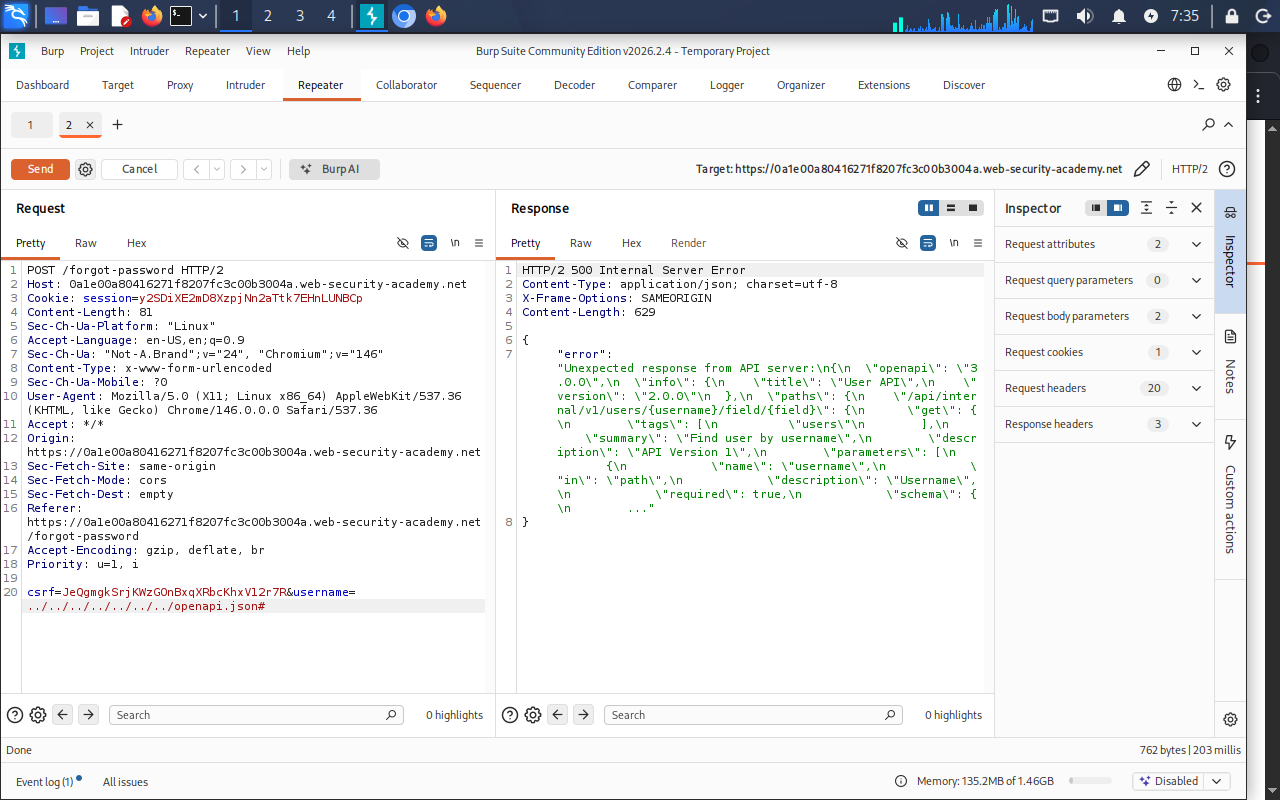
11. Discovering the API Definition
Once I had evidence that the API path could be manipulated, I tested for common API-definition files.
One successful request used:
1../../../../openapi.json%23
This resulted in an error message containing useful API information.
The response revealed an endpoint structured as:
1/api/internal/v1/users/{username}/field/{field}
This was a major breakthrough.
Instead of guessing the internal API structure, I now had an API definition describing how the endpoint was designed.
12. Understanding the Discovered Endpoint
The endpoint:
1/api/internal/v1/users/{username}/field/{field}
contains two dynamic components:
1username2field
Conceptually:
1/api/internal/v1/users/2 │3 └── {username}45/field/6 │7 └── {field}
This suggested that the API could retrieve a particular field belonging to a particular user.
For example:
1/api/internal/v1/users/administrator/field/email
could conceptually mean:
Retrieve the
administrator.
This was important because it revealed that the API wasn't simply retrieving a complete user record.
It was exposing specific user fields.
13. Testing the Field Parameter
I then attempted to manipulate the path so that the server-side request would contain:
1administrator/field/foo
The resulting username value was:
1administrator/field/foo%23
The API returned an error explaining that the requested field was invalid.
This was useful because the error revealed that the API recognized the injected structure and was actually processing the field parameter.
I then tested:
1administrator/field/email%23
The application returned the original response.
This indicated that:
1email
was a valid field.
At this stage, the hypothesis was becoming much stronger:
1User-controlled username2 ↓3Inserted into server-side URL4 ↓5Can inject additional path segments6 ↓7Internal REST API recognizes those segments
14. Investigating the Password Reset Token
I then reviewed the JavaScript file associated with the password-reset functionality:
1/static/js/forgotPassword.js
The JavaScript revealed the password-reset endpoint:
1/forgot-password?passwordResetToken=${resetToken}
This was another important discovery.
It established that the application expected a value called:
1passwordResetToken
to be supplied to the password-reset endpoint.
The next question became:
Can the internal API return the
passwordResetTokenfield?
15. API Version Discovery
I tested:
1administrator/field/passwordResetToken%23
The application returned an error stating that this field was not supported by the current API version.
This was an important clue.
The API definition had identified:
1/api/internal/v1/users/{username}/field/{field}
but the application indicated that the requested field wasn't available in that version.
Instead of assuming the field did not exist, I considered another possibility:
The field might be supported by another API version.
This led to another path manipulation test.
16. Changing the API Version
The server-side path was manipulated to target the earlier API version:
1../../v1/users/administrator/field/passwordResetToken%23
This time, the application returned the password-reset token.
This was the critical result of the exploitation chain.
The progression was:
1username parameter2 ↓3Server-side URL construction4 ↓5Path traversal6 ↓7API definition discovery8 ↓9Internal endpoint discovery10 ↓11Field manipulation12 ↓13API version manipulation14 ↓15passwordResetToken
The vulnerability therefore allowed the user-controlled parameter to influence the internal REST API request far beyond its intended purpose.
17. Password Reset
The recovered password-reset token was then supplied to the password-reset endpoint:
1/forgot-password?passwordResetToken=<TOKEN>
This opened the password-reset functionality.
I set a new password for the administrator account.
18. Authentication and Impact
I then logged in using:
1Username:2administrator34Password:5<new password>
After successfully authenticating as the administrator, I accessed the administrative functionality.
The final objective was to delete:
1carlos
Successfully deleting the user demonstrated the impact of the vulnerability.
The attack therefore progressed from a seemingly ordinary username parameter to administrative account takeover.
19. Attack Chain
The entire exploit can be summarized as:
1START2 │3 ▼4 POST /forgot-password5 username=administrator6 │7 ▼8 Investigate parameter9 │10 ▼11 Server-side URL manipulation12 │13 ▼14 Path traversal15 │16 ▼17 Escape expected API path18 │19 ▼20 Discover openapi.json21 │22 ▼23 Discover internal REST endpoint24 │25 ▼26 /api/internal/v1/users/{username}/field/{field}27 │28 ▼29 Inject field parameter30 │31 ▼32 Discover API version behavior33 │34 ▼35 Request passwordResetToken36 │37 ▼38 Obtain token39 │40 ▼41 Reset administrator password42 │43 ▼44 Login as administrator45 │46 ▼47 Delete carlos48 │49 ▼50 SOLVED
20. Key Payloads and Requests
The important values tested during the investigation included:
1administrator2administrator%233administrator%3F4./administrator5../administrator6../%237../../../../%238../../../../openapi.json%239administrator/field/foo%2310administrator/field/email%2311administrator/field/passwordResetToken%2312../../v1/users/administrator/field/passwordResetToken%23
The important discovery was not any individual payload.
The important discovery was why each payload was tested.
21. What I Learned
Server-side requests
A web application can receive a request from the browser and then make another request to an internal API.
1Browser2 ↓3Web application4 ↓5Internal API
Therefore, an input parameter can potentially influence a request that the user never directly sees.
Path traversal
The sequence:
1../
represents the parent path segment.
For example:
1/api/v1/users/../admin
can normalize conceptually to:
1/api/v1/admin
The important security issue occurs when an application allows user-controlled input to influence a path without properly restricting its destination.
URL encoding
I also reinforced the importance of understanding URL encoding:
1%23 = #2%3F = ?
Encoded characters can still have special meaning once decoded or interpreted in the appropriate context.
API enumeration through errors
Error messages were useful sources of information.
Rather than treating an error as simply a failed request, I used changes in error behavior as evidence about what the backend was doing.
For example:
1Invalid route
helped suggest that the supplied input was influencing routing.
Later:
1Invalid field
provided evidence that the internal API was actually interpreting an injected field component.
API documentation as an attack-surface map
The discovered openapi.json definition was particularly valuable because it revealed the structure of an internal API.
Instead of blindly guessing endpoints, I could reason from the API definition:
1/api/internal/v1/users/{username}/field/{field}
This demonstrated why exposed API specifications can become valuable reconnaissance material.
22. Root Cause
The underlying problem was not simply that ../ existed.
The deeper issue was that user-controlled input was incorporated into a server-side REST URL without sufficiently restricting what that input could represent.
Conceptually:
1const username = req.body.username;23const url =4 `http://internal-api/api/internal/v1/users/${username}`;56fetch(url);
The application expected:
1username = administrator
but did not sufficiently ensure that the value remained only a username.
An attacker could instead influence the structure of the server-side URL.
23. Defensive Considerations
A secure implementation should avoid blindly concatenating user-controlled values into URLs.
Potential defenses include:
- strict allowlisting of expected username formats,
- validating input according to its intended type,
- avoiding user-controlled URL path construction,
- safely encoding path components,
- canonicalizing and validating paths where path input is genuinely required,
- restricting internal API access,
- authenticating internal API requests,
- preventing unnecessary exposure of internal API documentation,
- avoiding overly descriptive error messages,
- and ensuring sensitive fields cannot be requested simply by changing a path parameter.
The most important principle is:
Validate data according to what it is supposed to represent, rather than allowing it to redefine the structure of the request.
24. Skills Demonstrated
Web Security
- Server-side parameter pollution
- REST API security
- Path traversal
- Authentication-flow analysis
- Password-reset security
- API enumeration
Burp Suite
- Proxy
- HTTP History
- Repeater
- Request manipulation
- Response analysis
Web Technologies
- HTTP
- REST APIs
- URL encoding
- URL/path semantics
- API specifications
- JavaScript analysis
Security Methodology
- Reconnaissance
- Hypothesis formation
- Controlled experimentation
- Error-based information gathering
- Attack-surface discovery
- Exploit chaining
- Impact verification
25. Final Reflection
The most valuable lesson from this lab was not memorizing a particular path-traversal payload.
The important lesson was learning to follow data flow.
The investigation started with:
1username=administrator
and gradually established that the value could influence:
1server-side URL2 ↓3REST API path4 ↓5API endpoint6 ↓7requested field8 ↓9password reset token
The vulnerability became apparent only after connecting those observations together.
This reinforced a key penetration-testing principle:
When an input behaves unexpectedly, don't immediately search for a payload. First determine where the input travels, how it is interpreted, and what the application does with it.